Blog
Sim racing on the living room TV with usbip and Moonlight
My gaming PC lives in the office. The living room has a TV, a couch, and enough floor space for a foldable cockpit. I wanted to race on the big screen without moving any hardware permanently. Just carry the cockpit over, plug it into a laptop, and play.
The usual answer is game streaming: run the game on the PC, stream video and audio to the laptop, output to the TV via HDMI. Sunshine and Moonlight do this well. But there’s a catch: a wheel and pedals kit isn’t a gamepad. Moonlight’s built-in controller forwarding doesn’t cover that. You need the game to see the actual wheel as if it were plugged in locally, so more USB ports are being used, further moving away from Moonlight’s original design.
That’s where usbip comes in.
The setup
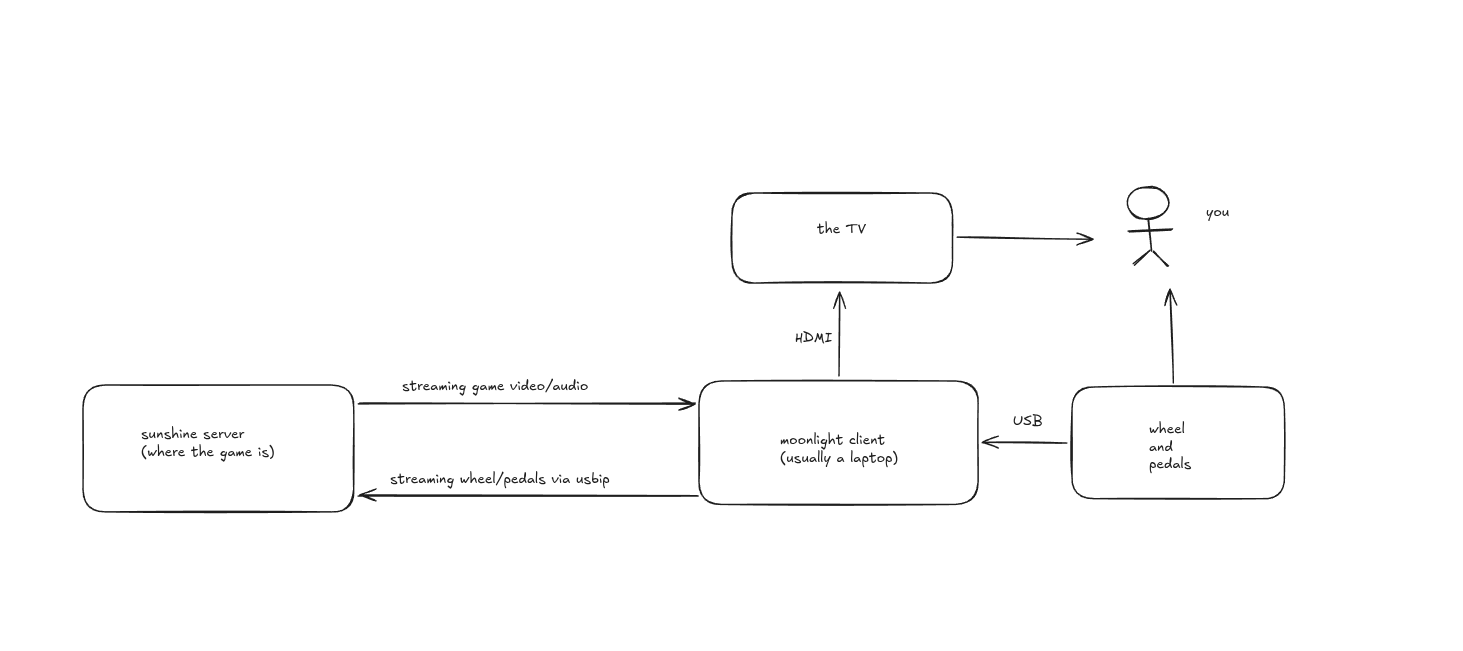
Four things on the network:
- Sunshine server: the PC where the game runs.
- Moonlight client: a laptop sitting next to the TV. Receives the video/audio stream and outputs to the TV over HDMI.
- Wheel, pedals, and possibly a shifter: plugged into the laptop via USB.
- The TV: just a display, connected to the laptop with an HDMI cable.
Sunshine/Moonlight handles the video and audio. That path is well-documented and works out of the box. The interesting part is getting the simracing gear from the laptop to the server. The actual configuration of Sunshine and Moonlight is straightforward and well-documented on both projects’ sites, so I’m not going to re-document that here. The usbip part is the piece that isn’t obvious.
usbip: forwarding USB devices over the network
usbip is a Linux kernel module that lets you export USB devices from one machine and attach them on another, over TCP. The remote machine sees the device as if it were physically plugged in. The game can’t tell the difference.
On the laptop you export the devices:
sudo modprobe usbip-host
sudo usbipd -D                    # start the daemon
sudo usbip bind -b 1-1            # bind the wheel
sudo usbip bind -b 1-2            # bind the pedals
sudo usbip bind -b 1-x            # bind the shifter, handbrake, etc.
On the server you attach them, the IP is the laptop’s LAN address:
sudo modprobe vhci-hcd
sudo usbip attach -r 192.168.1.x -b 1-1   # wheel
sudo usbip attach -r 192.168.1.x -b 1-2   # pedals
sudo usbip attach -r 192.168.1.x -b 1-x   # shifter, handbrake, etc.
That’s it. The server now has two new USB devices. Force feedback works. LEDs work (if you’ve set those up). The game sees a real wheel. I’d recommend scripting those commands for ease of use, what I did was write them in bind-wheel.sh (in the laptop) and attach-wheel.sh (in my desktop server) scripts. The bus IDs are stable as long as you plug into the same USB ports.
Latency
The question everyone asks. In practice, I can’t feel it. On a local network that’s well under a millisecond. Force feedback response feels identical to a direct connection. I’ve never noticed input lag from the wheel itself; I did notice some hiccups from the video encode/decode in Moonlight, since I’m on Wi-Fi.
The workflow
- Carry the wheel stand and the laptop to the living room.
- Plug the wheel into the laptop, HDMI into the TV.
- Run the bind script on the laptop, the attach script on the server.
- Open Sunshine on the server, open Moonlight on the laptop, launch the game.
- Race.
Tear-down is unplugging two cables and carrying the stand back. The whole setup takes about a minute.